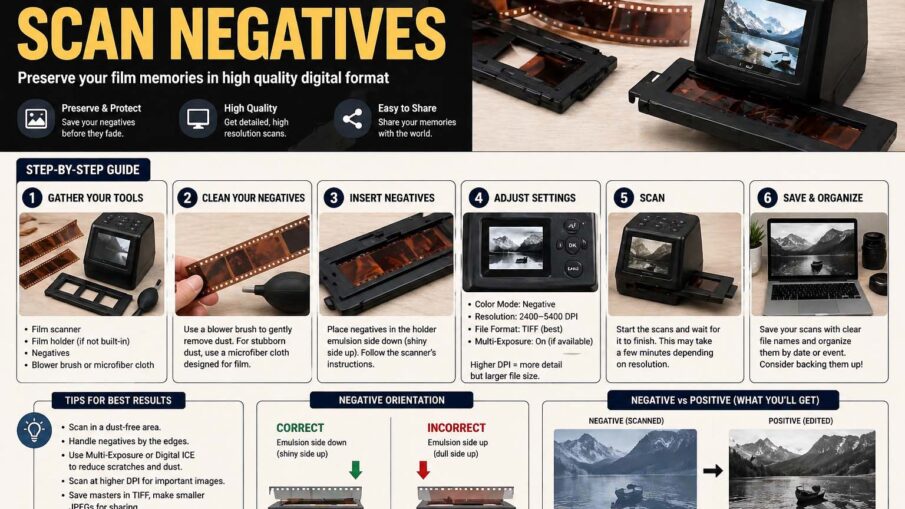
Photographs captured on film hold timeless value, but many people still have boxes of undeveloped memories stored as negatives. Learning how to scan negatives is one of the best ways to preserve family history, restore old images, and create digital backups that can last for generations. Whether you have black-and-white film, color negatives, or vintage rolls from decades ago, converting them into digital photos is easier than ever with the right tools and techniques.
In this guide, you will discover the best methods, equipment, and expert tips for turning fragile film strips into high-quality digital images.
Why Learning How to Scan Negatives Matters
Film negatives can fade, scratch, or become damaged over time. Heat, humidity, and dust often reduce image quality if they are stored improperly. Once negatives are scanned, they can be saved on your computer, edited, shared online, and printed whenever needed.
Digital copies also make it easier to organize family archives. Instead of searching through envelopes and boxes, you can label folders by year, event, or family member.
If you want to know how to scan film negatives, the first step is choosing the right scanner. Flatbed scanners with transparency adapters and dedicated film scanners are the most common options.
A film scanner is designed specifically for negatives and slides. It usually delivers sharper images, better color accuracy, and higher resolution. Flatbed scanners are more versatile because they can scan documents and photos too.
Before scanning, gently clean the negatives with a microfiber cloth or air blower. Dust particles can appear as spots in the final image, so proper cleaning saves editing time later.
Place the negatives carefully in the scanner holder, making sure they are aligned correctly. Use scanning software to select negative mode, adjust resolution, and preview the image before saving.
Choosing the Right Resolution
Resolution is important when converting negatives into digital files. If you plan to share photos online, 1200 to 2400 DPI is usually enough. For large prints or archival quality, use 3200 DPI or higher.
Higher resolution creates larger files, but it also captures more detail. If the negatives contain valuable family memories, it is usually worth choosing the highest practical setting.
How to Scan Old Film Negatives Safely
Many people search for how to scan old film negatives because older film needs extra care. Vintage negatives may be brittle, curled, or dusty after decades of storage.
Handle them only by the edges to avoid fingerprints. If the negatives are curled, place them under a clean heavy book for a short time before scanning. Never force them flat because old film can crack.
Some old negatives may have color shifts caused by age. Do not worry if the first scan looks faded or orange. Editing software can often restore contrast, color balance, and sharpness surprisingly well.
For highly valuable negatives, professional scanning services can be a smart option because they use advanced equipment and restoration tools.
How to Scan Negatives to Digital for Easy Sharing
One of the most common reasons people learn how to scan negatives to digital is convenience. Once the files are saved digitally, you can back them up in cloud storage, email them to relatives, or create photo books.
Choose a common file format such as JPEG for sharing or TIFF for maximum quality. JPEG files are smaller and easier to store, while TIFF files preserve more image detail for editing and archiving.
After scanning, rename your files clearly. Instead of random names, use titles like “Family Vacation 1985” or “Wedding Photos 1972.” This helps keep your collection organized.
Digital files can also be enhanced with photo editing software. You can remove scratches, improve brightness, sharpen details, and correct faded colors.
How to Scan Film Negatives With Regular Scanner
Many people wonder how to scan film negatives with regular scanner if they do not own a dedicated film scanner. The answer depends on the scanner model.
Some regular flatbed scanners include a backlight or transparency unit in the lid. This feature shines light through the negative, making proper scanning possible. If your scanner has this function, simply use the film holder and choose negative mode in the software.
If your scanner lacks backlighting, results may be limited. You can still experiment by placing a white light source above the negative while scanning, but image quality may not be ideal.
For occasional projects, a regular scanner can work well enough. For best long-term quality, dedicated film scanners remain the superior choice.
Smartphone Options for Scanning Negatives
Modern smartphones offer another way to digitize film. Negative scanning apps use your camera combined with a light source to capture the image and automatically invert colors.
This method is quick and affordable, especially for casual use. While quality may not match professional scanners, it can be perfect for social media sharing or quick previews.
To get better smartphone results, keep the phone stable, use bright even lighting, and clean the negative first.
Common Problems and Solutions
Sometimes scanned negatives look too dark, blurry, or strange in color. Usually, this can be fixed easily.
Dark images often need brightness adjustments or better scanner settings. Blurry scans may happen when the negative is not flat or the resolution is too low. Color problems are common with old film and can be corrected in editing software.
Best Storage Tips After Scanning
Once your negatives are digitized, keep both the originals and digital copies safe. Store negatives in acid-free sleeves in a cool, dry place away from sunlight.
Final Thoughts on How to Scan Negatives
Learning how to scan negatives is one of the smartest ways to preserve priceless memories. Whether you choose a film scanner, flatbed scanner, or smartphone method, the goal is the same: turning fragile old film into lasting digital images.